
API DOCS


API Documents
Below is the document to use the Moventry API for lead Provider
Send Lead
These are the fields which are required to call the API. Please Refer to the Coding section to understand it better.
URL : https://api.moventry.com/v1/send_new_lead/
| Fields | Type | Values Supported |
|---|---|---|
| providerId | Required | 6 character unique String e.g., D6i54g |
| firstName | Required | String: First Name e.g., John |
| lastName | Required | String: Last Name e.g., Snow |
| Required | String: Email e.g., john@moventry.com |
|
| phone | Required | String: Phone e.g., +1 285 454 5487 |
| loadingDwellingSize | Required | String: Move From Dwelling Size Supported Values Office Storage Partial Move Studio 1 Bedroom 2 Bedrooms 3 Bedrooms 4 Bedrooms 4+ Bedrooms |
| loadingCity | Required | String: Move From City Name e.g., Temple |
| loadingState | Required | String: Move From State code e.g., TX Find all State codes here |
| loadingZip | Required | String: Move From Zip Code e.g., 76502 |
| unloadingDwellingSize | Required | String: Move To Dwelling Size Supported Values Office Storage Partial Move Studio 1 Bedroom 2 Bedrooms 3 Bedrooms 4 Bedrooms 4+ Bedrooms |
| unloadingCity | Required | String: Move To City Name e.g., Houston |
| unloadingState | Required | String: Move To State code e.g., TX Find all State codes here |
| unloadingZip | Required | String: Move To Zip Code e.g., 76508 |
| movingDate | Required | String: Moving Date mm/dd/yyyy e.g., 06/28/2020 |
All State Codes
| State or Region Code | Name |
|---|---|
| AA | Armed Forces America |
| AE | Armed Forces |
| AP | Armed Forces Pacific |
| AK | Alaska |
| AL | Alabama |
| AR | Arkansas |
| AZ | Arizona |
| CA | California |
| CO | Colorado |
| CT | Connecticut |
| DC |
Washington DC |
| DE | Delaware |
| FL | Florida |
| GA | Georgia |
| GU | Guam |
| HI | Hawaii |
| IA | Iowa |
| ID | Idaho |
| IL | Illinois |
| IN | Indiana |
| KS | Kansas |
| KY | Kentucky |
| LA | Louisiana |
| MA | Massachusetts |
| MD | Maryland |
| ME | Maine |
| MI | Michigan |
| MN | Minnesota |
| MO | Missouri |
| State or Region Code | Name |
|---|---|
| MS | Mississippi |
| MT | Montana |
| NC | North Carolina |
| ND | North Dakota |
| NE | Nebraska |
| NH | New Hampshire |
| NJ | New Jersey |
| NM | New Mexico |
| NV | Nevada |
| NY | New York |
| OH | Ohio |
| OK | Oklahoma |
| OR | Oregon |
| PA | Pennsylvania |
| PR | Puerto Rico |
| RI | Rhode Island |
| SC | South Carolina |
| SD | South Dakota |
| TN | Tennessee |
| TX | Texas |
| UT | Utah |
| VA | Virginia |
| VI | Virgin Islands |
| VT | Vermont |
| WA | Washington |
| WI | Wisconsin |
| WV | West Virginia |
| WY | Wyoming |
Coding Reference
So far we have added 2 programming language access.
$ch = curl_init();
$curlConfig = array(
    CURLOPT_URL            => "https://api.moventry.com/v1/send_new_lead/",
    CURLOPT_POST           => true,
    CURLOPT_RETURNTRANSFER => true,
    CURLOPT_POSTFIELDS     => array(
        'providerId'           => 'D6i54g',
        'firstName'            => 'John',
        'lastName'             => 'Snow',
        'email'                => 'john@moventry.com',
        'phone'                => '+12854545487',
        'loadingDwellingSize'  => 'Office',
        'loadingCity'          => 'Temple',
        'loadingState'         => 'TX',
        'loadingZip'           => '76502',
        'unloadingDwellingSize'=> 'Office',
        'unloadingCity'        => 'Houston',
        'unloadingState'       => 'TX',
        'unloadingZip'         => '76508',
        'movingDate'           => '06/28/2020'
    )
);
curl_setopt_array($ch, $curlConfig);
$result = curl_exec($ch);
curl_close($ch);
echo $result;
$.ajax({
    url: 'https://api.moventry.com/v1/send_new_lead/',
    method: 'post',
    data: {
        'providerId': 'D6i54g',
        'firstName': 'John',
        'lastName': 'Snow',
        'email': 'john@moventry.com',
        'phone': '+12854545487',
        'loadingDwellingSize': 'Office',
        'loadingCity': 'Temple',
        'loadingState': 'TX',
        'loadingZip': '76502',
        'unloadingDwellingSize': 'Office',
        'unloadingCity': 'Houston',
        'unloadingState': 'TX',
        'unloadingZip': '76508',
        'movingDate': '06/28/2020'
    },
    dataType: 'json',
    success: function(data) {
        console.log(data);
    }
});
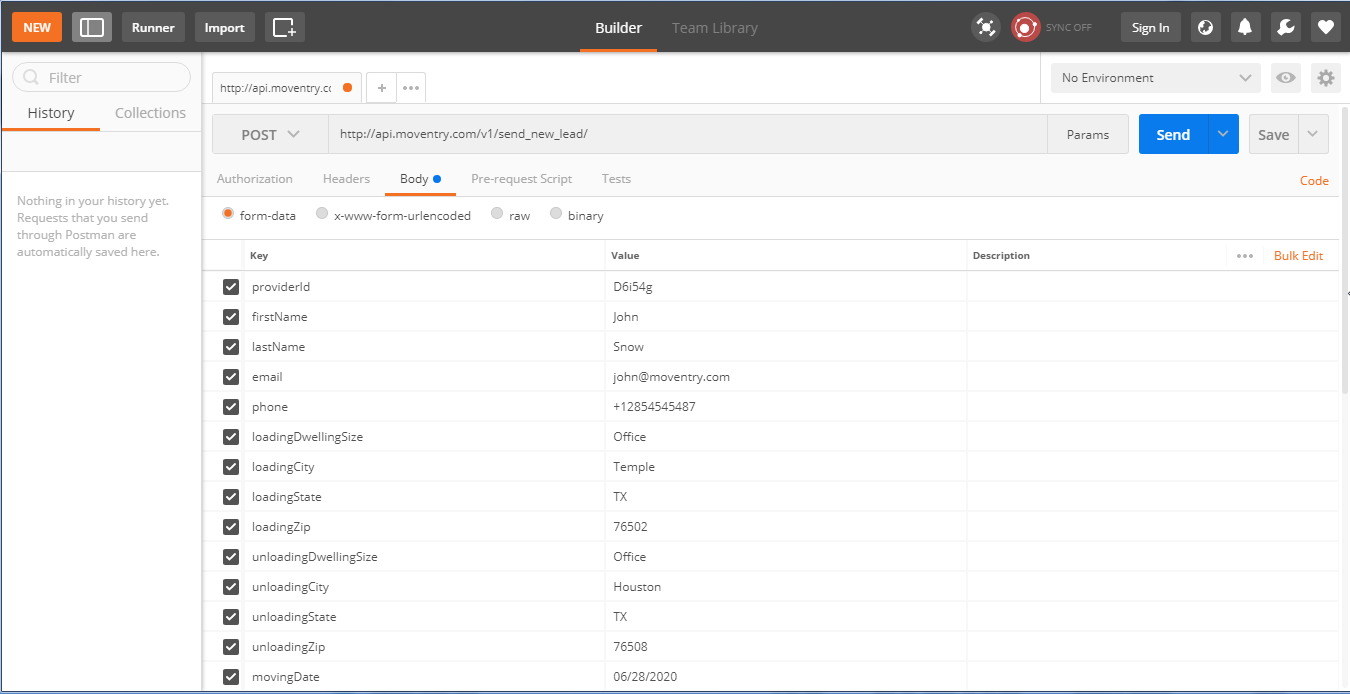
Using Postman
You can easily use Postman to send a lead. Follow these simple steps:
- Download the Postman Google Chrome Extension from here
- Select "POST" as the HTTP method
- Navigate to the "Body" tab
- Choose the "form-data" option
- Add all required keys and their corresponding values
- Click the "Send" button
- You're all set!
Online Form
For a more user-friendly approach, you can use our online form to send leads:
Send Lead Online
Click the button below to access our online lead submission form.
Go to Online Form